 VoxelPlay Hub
VoxelPlay Hub
VoxelPlay Hub
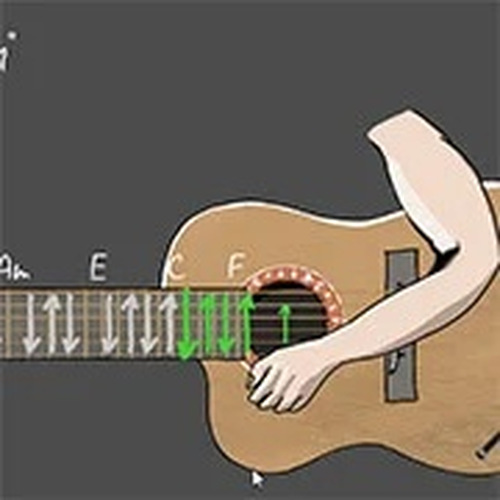
Guitar Simulator – Siberian Punk offers a straightforward and enjoyable music experience. The mouse-based string pinching and keyboard chord system are easy to learn, making it accessible for all ages. The game encourages creativity by letting you experiment with different chord combinations. While it is not a full music production tool, it provides a fun and relaxing way to pass time and explore basic music concepts. The clean design and immediate feedback make it a pleasant choice for casual play.
Guitar Simulator – Siberian Punk Online Music Game is a creative music simulation that lets you play a virtual guitar using your computer. Designed for all ages, it offers a relaxing way to explore music without any prior experience. The core objective is to enjoy the process of making music by experimenting with different chord combinations and creating your own melodies. Whether you are a music lover or just looking for a fun activity, this simulator helps you express yourself through sound in a safe and family-friendly environment.
To play, you use your mouse to interact with the virtual guitar. You can pinch the strings by clicking with your left mouse button and move your mouse to control the hand position. The keyboard allows you to produce chords: pressing keys 1 through 9 creates major chords, while pressing keys q, w, e, r, t, y, u, i, and o creates minor chords. You can also press the Shift key for an 'empty chord' effect. The controls are simple and intuitive, making it easy for beginners to start playing right away. Experiment with different combinations to create various sounds.
This simulator offers an interactive music experience with simple controls that are accessible to players of all ages. It is family-friendly and provides a safe environment for creative exploration. No downloads or installations are required, as the game works directly in your web browser. Players have the creative freedom to explore chords and sounds, allowing them to compose their own music without needing a real instrument. The game is designed to be a relaxing outlet for short breaks or longer sessions.
To get the most out of the Guitar Simulator, take time to experiment with different chord combinations to discover new sounds. Practice regularly to become more comfortable with the controls and to improve your ability to create melodies. Start by trying simple chord progressions and gradually build up to more complex sequences. Use the empty chord effect to add variety to your music. Most importantly, focus on having fun and expressing yourself creatively, as the goal is enjoyment rather than perfection.

Realistic medical simulation with clear instructions. Great for learning focus and precision.

A charming arcade game with a unique coin-punching twist. Easy to learn and rewarding to master.

A charming cooking game that tests memory and speed. Great for TMNT fans and family fun.
Safe, creative, and easy to learn. Great for kids and family play sessions.

Clever satire with meaningful choices. Perfect for thoughtful players who enjoy narrative depth.

Clean design and smooth gameplay. Great for short breaks and donut lovers.

Clean controls and satisfying gameplay. Great for quick sports fun.

Clear instructions and colorful graphics make this medical game both educational and enjoyable for all ages.